01
Remembers the drives in the drawer
Plug each drive in once. Drawerful remembers what’s on it, so new copies are found even while it’s back in the drawer.
 Drawerful
Plug in your drives, even the ones in a drawer. Drawerful keeps one copy of everything.
30-day refund · macOS 14 or later · 14.9 MB · no account
How it works
You bought a bigger drive and kept the old one, just in case. You backed up before a reinstall. The phone filled up, so everything got copied again. Every one of those was the right call.
Plug each drive in once. Drawerful remembers what’s on it, so new copies are found even while it’s back in the drawer.
Biggest first, with my picks ready. The copy that stays is marked, even on a drive that isn’t plugged in.
Spare copies wait on their own drive. Restore puts any of them back, licence or not.
A desk like yours
2014
Rugged portable · 2 TB
TRAVEL. Bought for the Goa trip. The same trip went in twice: once from the camera, once from the phone.
+12 GB stored twice
2016
3.5 in desktop drive · 4 TB
PHOTOS (OLD). The photos needed a drive of their own. The holidays moved over, and stayed behind too.
+29 GB stored twice
2017
Laptop drive, clear case · 1 TB
BACKUP before reinstall. You copied everything before the reinstall, like you should. The reinstall went fine. The backup stayed.
+37 GB stored twice
2019
Slim portable · 1 TB
BACKUP 2019. A friend lost a laptop, so you backed up that same afternoon. Nobody deletes a drive that says DO NOT DELETE.
+53 GB stored twice
2021
Aluminium SSD · 1 TB
BACKUP of backup?. The phone was full, so everything got copied again. The question mark was honest.
+58 GB stored twice
2024
USB pen drive · 256 GB
WEDDING FINAL final. The wedding photos, one more time, on a stick for your parents. It came back, and went in the drawer.
+25 GB stored twice
ready to free. 0 files deleted.
Twelve years, folded up. One copy of everything stays.
My own desk: a Mac and three SSDs. 790 GB stored twice.
Try it here
A working copy of Drawerful, with the drives from the desk above. Each answer takes one click.
TRAVEL is in the drawer, not plugged in. Search it anyway.
The drive in the drawer still counts.
goa-beach.jpg on TRAVEL, IMG_4471.JPG on BACKUP 2019. Press Look inside.
A renamed copy is still a copy.
The spare is already selected. Now select the copy that stays, too.
You can’t lose the last one.
Press Set aside. The spares move to a folder on their own drive.
Nothing is deleted.
Nothing deleted for good, ever
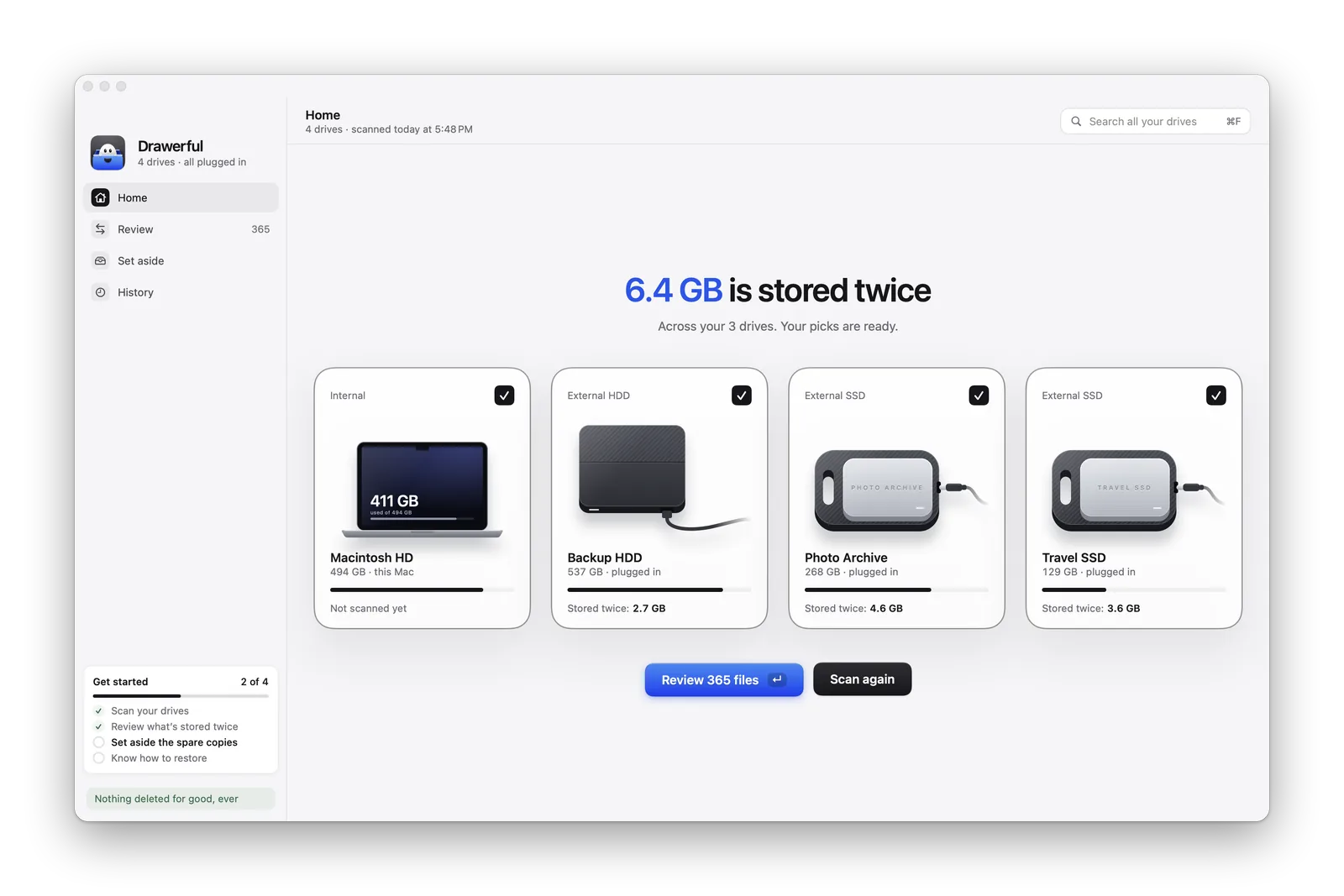
214 GB is stored twice
Across your 7 drives. Your picks are ready.
Searched all 7 drives. 2 are plugged in.
Biggest first · I’ve selected my picks, change anything
 4.2 MB4.2 MB
Two names, two drives. The same photo?
MatchDifferent names, the same size. Before I set one aside, I read both in full.
Size4.2 MB each
17.6 MB set aside, still using space on BACKUP 2019 until you delete it
Nothing set aside yetSpares you set aside wait here, in a folder on their own drive.
Deleted for good only when you say so.
macOS 14 or later · Apple silicon and Intel · 14.9 MB
Side by side
Drawerful and three apps you may know, on the five points where they differ.
| Feature | Drawerful | Gemini 2 | dupeGuru | PhotoSweeper |
|---|---|---|---|---|
| Remembers drives that aren’t plugged in | Yes | Not that we found | Not that we found | Not that we found |
| Where removed copies go | Set aside on the same drive | The Bin (or hard links, or deleted) | The Bin (or links, deleted, or moved) | The Bin (Photos: an album) |
| Putting one back | Restore, any time | From the cleanup screen, then the Bin | From the Bin, if sent there | From the Bin |
| Price | $29 once, one Mac, a year of updates | Subscription, from $1.95 a month | Free, open source | $14.99 once |
| Last release | November 2026 | September 2026 | July 2022 | 2026 |
All four find look-alike photos.
Private by design
Price
Drawerful for macOS
$29once
plus local tax · one licence, one Mac, a year of updates
Already bought? Download Drawerful
Signed and notarised · macOS 14 or later
Questions
No, you pay once.Every version released in the year after you buy is yours, the app keeps working forever, and renewing for later versions is up to you.
Yes, two ways.There’s a working copy of Drawerful on this page, on pretend drives: search a drive that’s in the drawer, find a renamed copy, try to remove both copies, set one aside and bring it back. Try it here. And every purchase comes with a 30-day refund, so you can run it on your real drives and ask for your money back if it isn’t for you. No account, no upload.
macOS 14 or later, on Apple silicon and Intel.It’s a 14.9 MB download, signed with my Developer ID and notarised by Apple, so it opens without warnings, and it updates itself (it asks first).
The licence moves with you.One licence is for one Mac, and you can move it to another Mac from inside the app.
Will it delete anything? Will unplugged drives count? You just tried both, up there.
Not on its own.What you set aside waits on the same drive until you delete it for good, or after 30 days if you choose that in Settings. A file that exists in only one place is never offered.
Yes.Plug each in once; Drawerful remembers what’s on it, so it counts in every comparison and you can search it.
Your files never leave your Mac.No account, no upload, no tracking in the app. It checks your licence and looks for updates, nothing else.
It remembers drives that aren’t plugged in.We didn’t find that in Gemini 2. Drawerful sets copies aside on the same drive instead of the Bin, you can Restore any time, and it never takes the last copy. And you pay once: $29, where Gemini 2 is a subscription from $1.95 a month. Both find look-alike photos.
30-day refund · macOS 14 or later · 14.9 MB · no account